Live consortium activity, at a glance

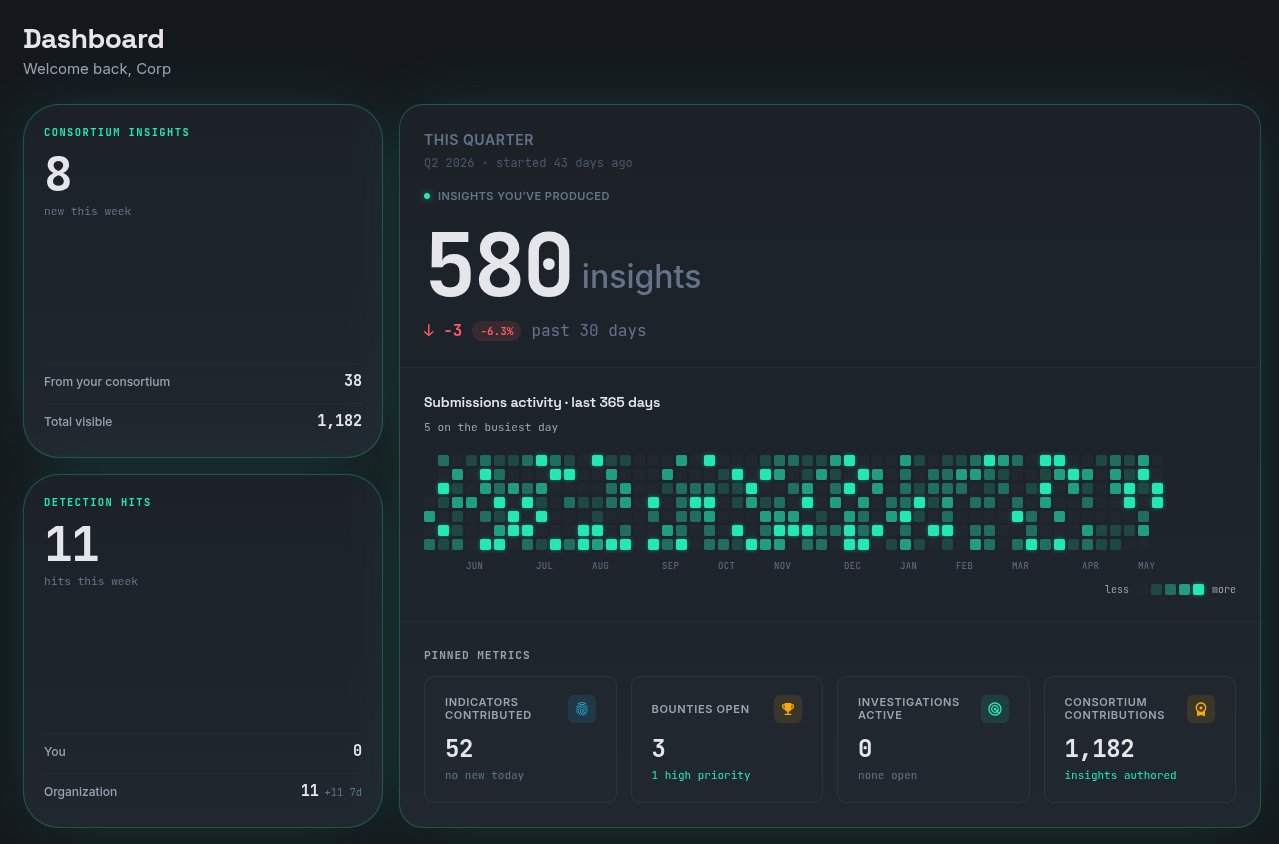
The home dashboard surfaces what your consortium peers are sharing right now: new BOLOs, fresh indicators, the latest signed insights. Every share is cryptographically attributable down to the indicator, so you always know which organization wrote what and when.

  • Live feed of newly-shared indicators, scoped to the consortia you belong to
  • Signed-by-org attribution on every entry, so there's no anonymous data in the graph
  • Click through to the full insight, the source org, or any referenced cluster
Intel Consortium dashboard: live activity feed with signed shares from member organizations

Walk your threat graph

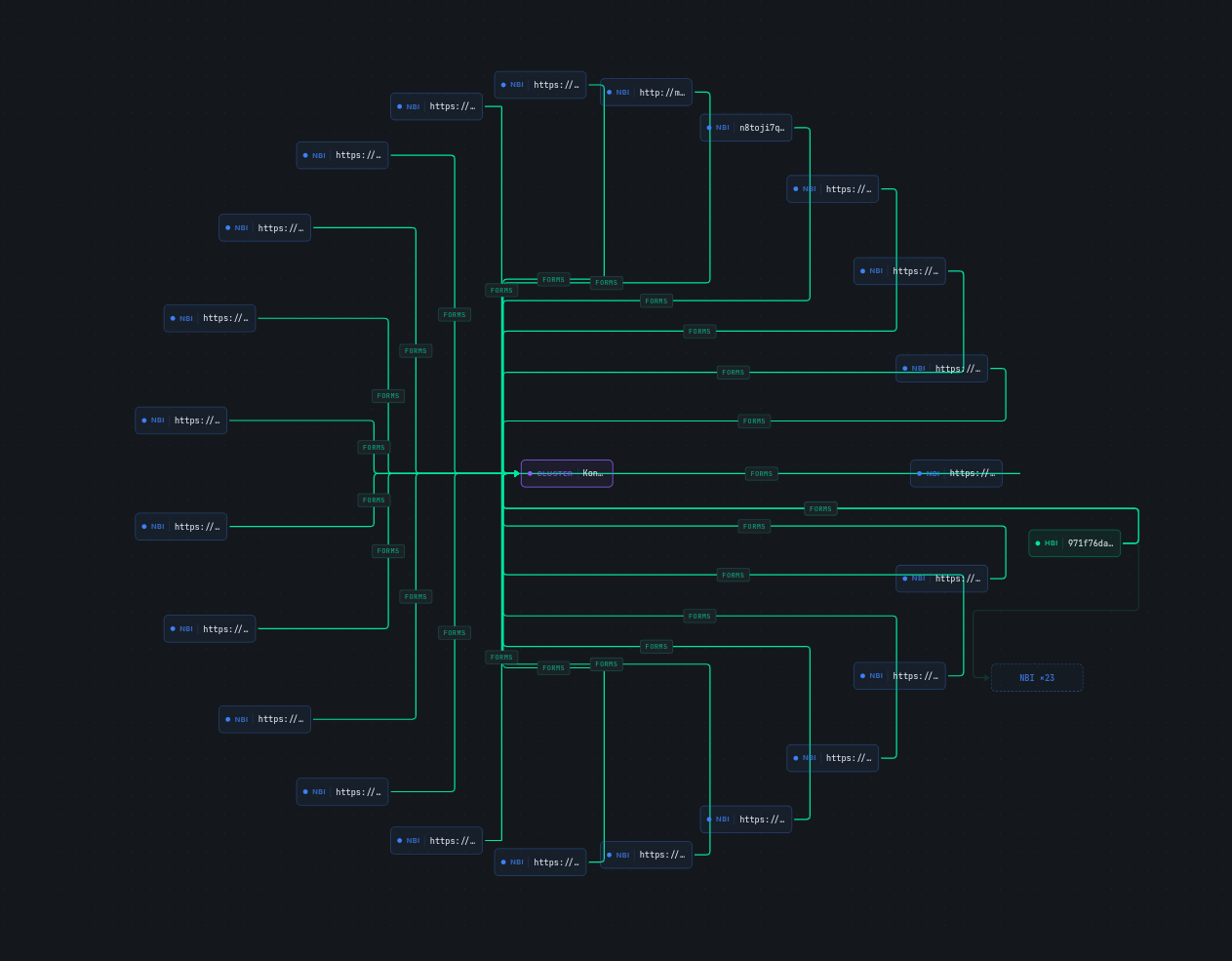
Run a single ICQL query, then expand the result graph visually. Click any node to follow its signed relationships: indicators to clusters, detections to the indicators that fired them, events to the systems they touched. Filter by TLP, time window, or signing org; pin nodes to an investigation as you go.

  • Visual traversal of ICQL results, with every edge labeled with the relationship type and signing org
  • TLP-aware filtering: tag clearance gates what's visible without leaking source-org identity
  • Pin to investigation, import a STIX 2.1 bundle, or copy the equivalent ICQL back to your editor
ICQL graph view: expanded indicator-to-cluster traversal with TLP filtering

Keyboard-first navigation across the whole app

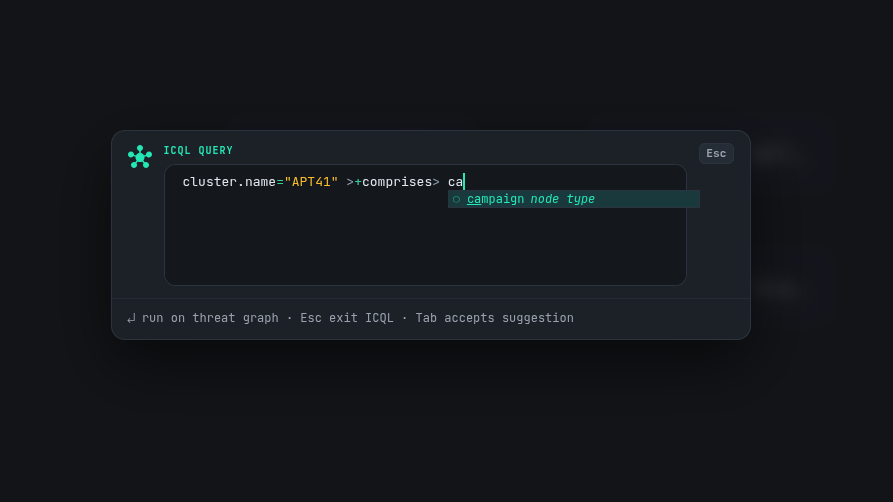
Cmd+K from any page opens the command palette. Jump to any surface in the app, run an ICQL query, or ask the built-in guides a question, all from one box. Built for analysts who don't want to leave the keyboard.

  • A single shortcut for every surface, with no per-page hotkeys to memorize
  • Content-aware search across the shipped guides, answered on-device
  • Run an ICQL query directly from the palette without opening the query editor
Intel Consortium command palette: ICQL query pane with node-type autocomplete

A threat intelligence graph that gets out of the way

Most threat intelligence platforms bury you in complexity before you can do anything useful. ICDB starts simple and stays simple, until you need it not to be.

01 Simple

One binary. Zero dependencies. Run it and go.

ICDB ships as a single executable. Download it, run it, and you have a working threat intelligence graph backed by an embedded database. No external services, no configuration files, no setup wizard.

When you outgrow the single binary, when you need dedicated PostgreSQL, a production frontend, horizontal scaling, everything is there. But you choose when to add that complexity, not the tool.

./icdb serve Development: embedded database, zero config
docker compose up Production: PostgreSQL, dedicated frontend, TLS
$ ./icdb

INFO  mode=platform database=embedded
INFO  schema loaded nodes=6 edges=8
INFO  listening on :8080
INFO  ready in 340ms

02 Approachable

A graph that documents itself.

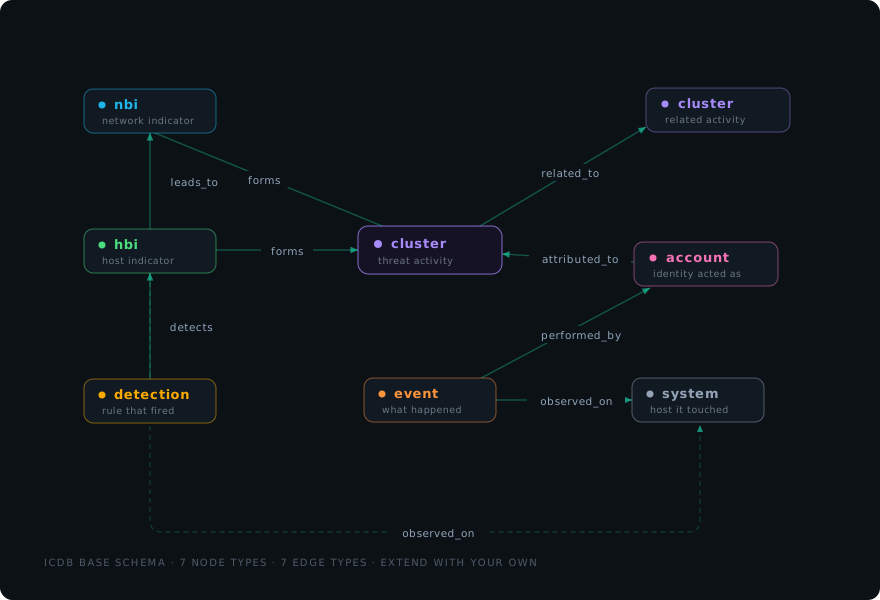
The default ICDB graph models threat activity with a small, focused set of node and edge types. Nodes are Cluster, HBI (host-based indicator), NBI (network-based indicator), Detection, Account, Event, and System. Edges read like English: forms, detects, observed on, attributed to, performed by, leads to, and related to. If you can read the edge label, you understand the relationship.

No 40-page specification to read before you can create your first node. The graph is self-documenting: every type and edge has a semantic label, and the schema viewer shows exactly which node types each edge can connect.

And when your team needs a custom schema, maybe you work in fraud instead of malware, or you need to model supply chain risk, the graph is fully extensible. Define your own node types, edge types, and properties. Start with the default, evolve from there.

ICDB base graph schema: cluster, hbi, nbi, detection, account, event and system nodes connected by the forms, detects, observed_on, attributed_to, performed_by, leads_to and related_to edges

03 Automation First

Machines build the graph. Humans do attribution.

The vast majority of connections in an ICDB graph are created automatically. Indicators flow in from built-in OSINT feeds and your security stack. Detection results pushed in from your existing tools create edges. Consortium partners share indicators that land in your graph pre-linked.

The work that actually requires a human such as attribution, judgment calls, connecting the dots between campaigns is where your analysts spend their time. Not copying and pasting indicators between spreadsheets.

Inside a consortium, BOLOs (“be on the lookout”) match every incoming indicator against patterns your team registered. When a partner shares data that fits one of your standing patterns, you know immediately.

Automated
  • Open-source feed ingestion
  • Indicator-to-cluster linking
  • Consortium data sync
  • Detection result import
  • Standing watch queries
Human judgment line
Manual
  • Attribution decisions
  • Campaign analysis
  • Investigation reports

04 Ownership-Based Permissions

Start open. Tighten when the team grows.

ICDB ships with cluster governance open: anyone on your tenant can extend anyone’s cluster. That is the right default for a team of three who trust each other, and it means nothing is in your way on day one.

When you outgrow it, ownership is a switch, not a migration. Move a cluster to members only and just its contributors can edit; move it to review required and the owner approves every attribution and edit before it lands. The analyst closest to the work decides how tightly it is held.

This is deliberately different from the top-down access control most platforms use, where an administrator sets everyone’s visibility up front. Combined with TLP markings on every piece of shared data, it lets sensitive investigations stay private without forcing that ceremony onto the ones that do not need it.

Clusters · one tenant owner decides
Cluster Governance
  • ClickFix open Anyone on the tenant extends it · 14 contributors
  • unc897 members only Its 6 contributors edit · owner adds members
  • APT28 review required Owner approves every attribution · TLP:RED
governance is per cluster, not per tenant

05 End-to-End Encrypted Sharing

Closed groups that share threat intelligence. Nothing leaks in transit.

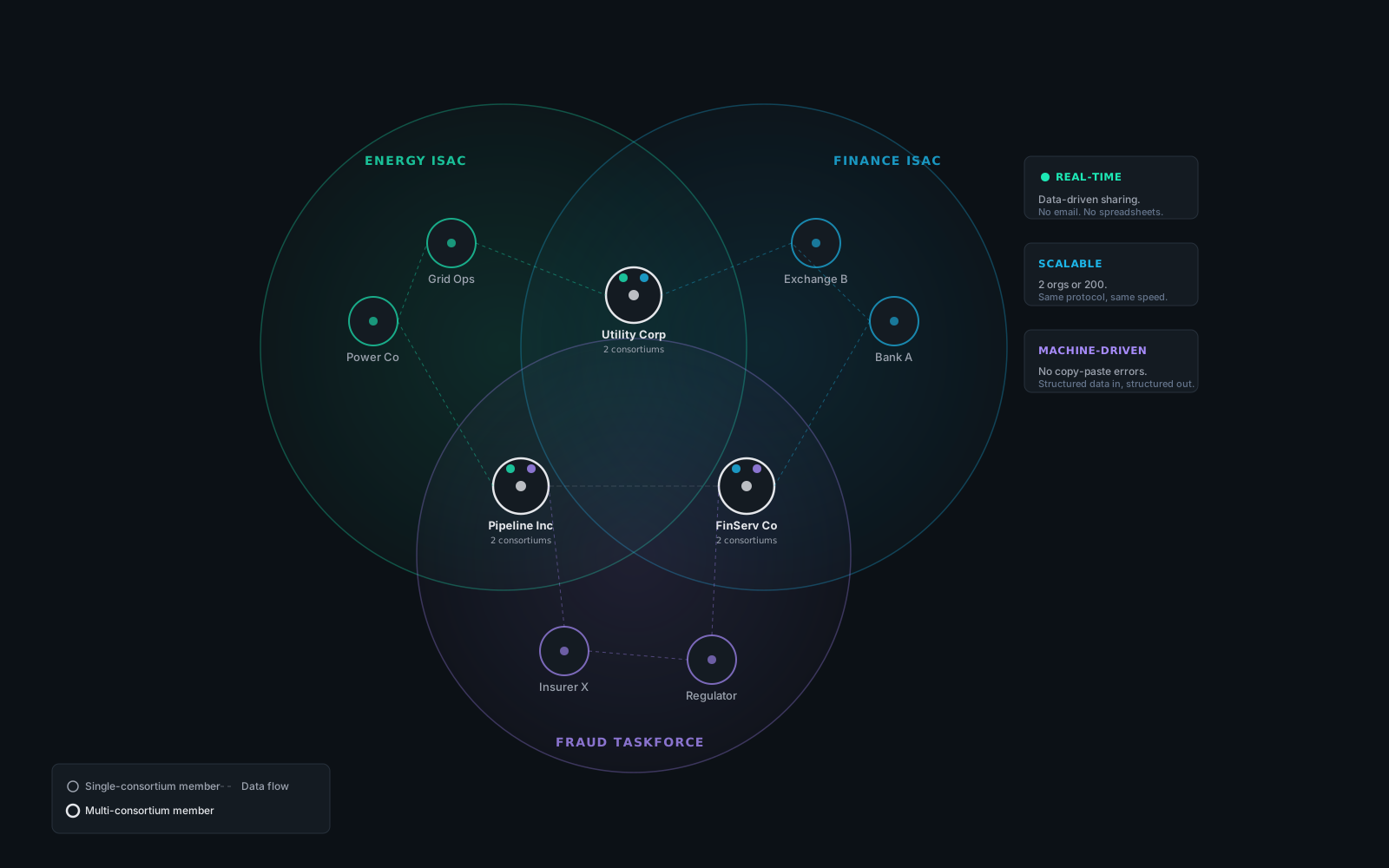
By default a consortium is private: invite-only. An owner creates the consortium, emails invite tokens, and approves each new member, so there is no accidental exposure. When you want reach instead of secrecy, an owner can list a consortium in the public directory, with joins either owner-approved or open. The default is closed; opening up is a deliberate choice.

When you share data through a consortium, it is end-to-end encrypted with X25519 ECDH + AES-256-GCM before it leaves your instance. The relay broker that moves ciphertext between members cannot read it. Each organization holds its own encryption keys, so even the platform operator sees only opaque bytes.

Post and share BOLOs to alert your consortium when you see a critical indicator. Members that also observe it in their own network can reply with additional context.

Venn diagram showing organizations belonging to multiple intelligence-sharing consortiums with real-time data flows

06 Cryptographic Provenance

Every share is signed. Nobody can deny it. Nobody can forge it.

End-to-end encryption keeps a message private between sender and recipient. It does not, on its own, prove who sent it. A recipient holding only encrypted ciphertext can fabricate a plausible-looking envelope after the fact. That’s the “Alice said it, not me” deniability problem, a real concern when intel is shared between competitors, regulated entities, or organizations that may end up in a dispute.

ICDB solves this with an Ed25519 signature on every share, separate from the encryption key, published to the broker’s PKI directory. Before encryption, the sender signs the exact indicator payload with their long-term signing key. The recipient verifies the signature against the broker’s PKI, then appends the original signed payload to their own tamper-evident ledger.

This produces third-party-verifiable attribution: any member can prove, months after the fact, that this specific organization signed this specific indicator at this specific time. Senders are bound to what they shared. Recipients cannot forge new shares to blame on a peer. The signature travels with the payload through every handoff.

Alice / Acme
sender
Ed25519 sign
IOC + sig + sender_id
signed payload
X25519 + AES-GCM
ciphertext
broker sees only this
blind broker · PKI directory · no plaintext access
Bob / Gamma
recipient
decrypt
verify sig vs. PKI
append to ledger
non-repudiable

07 Tamper-Evident Consortium Ledger

A per-consortium audit trail.

Every member holds a private, append-only immudb database for each consortium they belong to. Signed share events are appended on both sides: the sender’s outgoing tape and the recipient’s incoming tape. immudb’s Merkle structure makes the tape tamper-evident: any after-the-fact edit invalidates the proof for every subsequent entry.

ICDB’s broker is a blind encrypted relay. Members hold their own ledgers; the broker only routes ciphertext between them.

Because proofs are scoped per-consortium (one immudb database per group you belong to), you can produce an audit-grade export for a single consortium’s regulator, auditor, or peer-in-dispute without leaking the existence of any other consortium you participate in.

The result is permissioned multi-party data exchange without consensus: the resilience and audit guarantees of a blockchain without tokens, without miners, without a central orderer.

consortium_<uuid> · local immudb database
  1. tx 1 genesis created by Acme sha · a0b1…
  2. tx 2 invite Acme → Gamma sha · c2d3…
  3. tx 3 acceptance signed by Gamma sha · e4f5…
  4. tx 4 share Acme → IOC 1.2.3.4 sha · 6a7b…
  5. tx 5 share Gamma → IOC evil.example sha · 8c9d…
  6. tx 6 retract Acme retracts 1.2.3.4 (false positive) sha · ef01…

08 Hosted or Self-Hosted

Your data. Your infrastructure. Your choice.

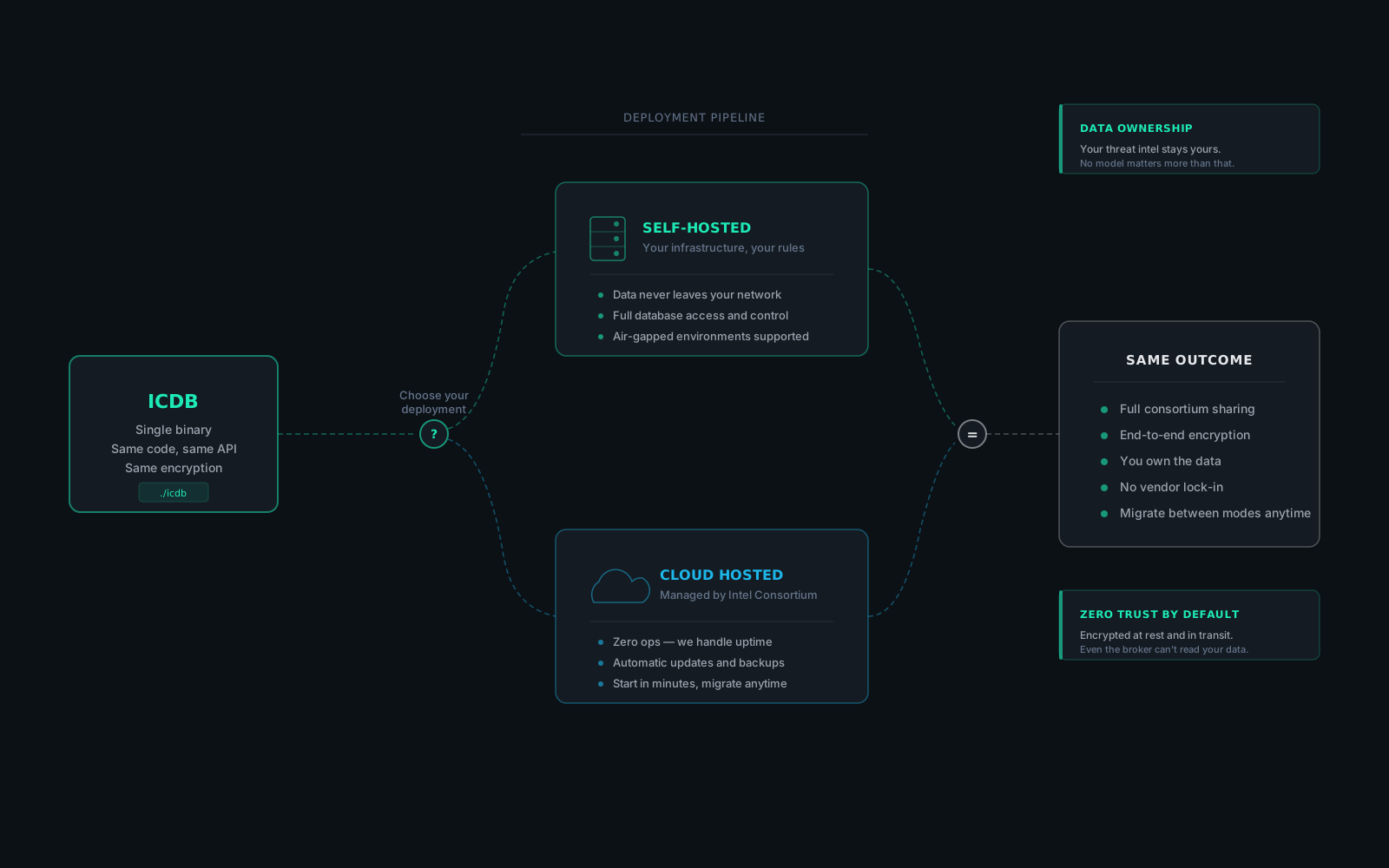
Threat intelligence is some of the most sensitive data your organization handles: indicators tied to active investigations, attribution decisions, consortium-shared intel under TLP controls. Where that data lives matters.

ICDB gives you the choice. Run it on our hosted platform, or deploy the same binary behind your own firewall. Either way, you own the data. There is no vendor lock-in, no data residency surprises, no third party with access to your investigations.

Consortiums work across both models. A self-hosted member and a cloud-hosted member share data through the same encrypted broker. No one is forced into a deployment model they do not control.

Deployment pipeline branching into self-hosted and cloud-hosted paths, reconverging on same outcome

Ready to try it?

One binary. Five minutes. Your first threat graph.